Assisted Manual Outbound User guide

What is the Assisted Manual Outbound (AMO)?
Assisted Manual Outbound (AMO) is a powerful tool within QueueMetrics that enables agents to efficiently manage and execute outbound calls. AMO automates the selection of the next call in the queue, providing agents with all necessary information to complete the call, while ensuring accurate logging and reporting.
This guide is designed to help users understand and effectively utilize the Assisted Manual Outbound (AMO) feature within QueueMetrics. AMO simplifies the management of outbound call lists by allowing agents to process outbound calls manually, with minimal effort.
Table of Contents
| Overview | Main concepts | |
| Assisted Manual Outbound overview and what it does | Main concepts to keep in mind | |
| Understanding The Different Outbound Modes | Agent’s guide | |
| Differences between the outbound call tracking modes | How does the AMO feature work, from the Agent’s perspective | |
| Setting it up | Call Life Cycle | |
| How do I set up and enable the AMO feature | Details on the life cycle of a call | |
Overview
Assisted Manual Outbound (AMO) is a powerful tool in QueueMetrics that helps agents efficiently manage and process call lists manually. AMO simplifies the process of handling outbound calls by allowing agents to pull the “next” call they need to make, with all relevant information at their disposal. Campaigns configured for AMO dialing allow agents to process calls more efficiently and faster.
Main Concepts
Understanding the core concepts of AMO is essential for effectively utilizing the feature:
- Campaigns: Outbound queues configured for AMO dialing. Any outbound queue can be a campaign, by enabling the AMO option in the queue configuration.
- Call Lists: Sets of numbers to be called, linked to campaigns.
- Mixer: A system that manages and prioritizes call lists within a campaign.
- Weight: Priority for the different lists, for the campaigns. A campaign can have multiple lists assigned, the higher the weight, the higher the priority.
- Valid outcomes: Condition for a call to be considered complete. A valid outcome is assigned by the Agent, using the Outcome feature in QueueMetrics.
- Recall stepping: The minimum interval before the next recall, with options for fixed, linear, or exponential retry periods.
- QAP: It’s the QueueMetrics Agent Page, the latest version of the Agent page.
Understanding The Different Outbound Modes
QueueMetrics supports various outbound call modes:
- Passive Outbound: An agent places an outbound call, and it’s tracked on the
q-outboundvirtual queue. No special handling is needed. - Manual Outbound: The agent manually dials a number from an external source and flags it within QueueMetrics for proper tracking.
- Recall Memo: While using the QueueMetrics agent page (QAP), during a call, the agent schedules a follow-up call, which appears in the agent’s daily calendar.
- WombatDialer-Based Recall: Automated scheduling of recalls via WombatDialer (QAP not needed).
- WombatDialer-Based Preview Dialing: Agents use WombatDialer to preview and accept or reject calls (QAP suggested).
- Assisted Manual Outbound: The system assigns the next available call from the relevant campaign, and the agent initiates it with a single click from the QueueMetrics agent page.
Agent’s Guide
How does the Assisted Manual Outbound work
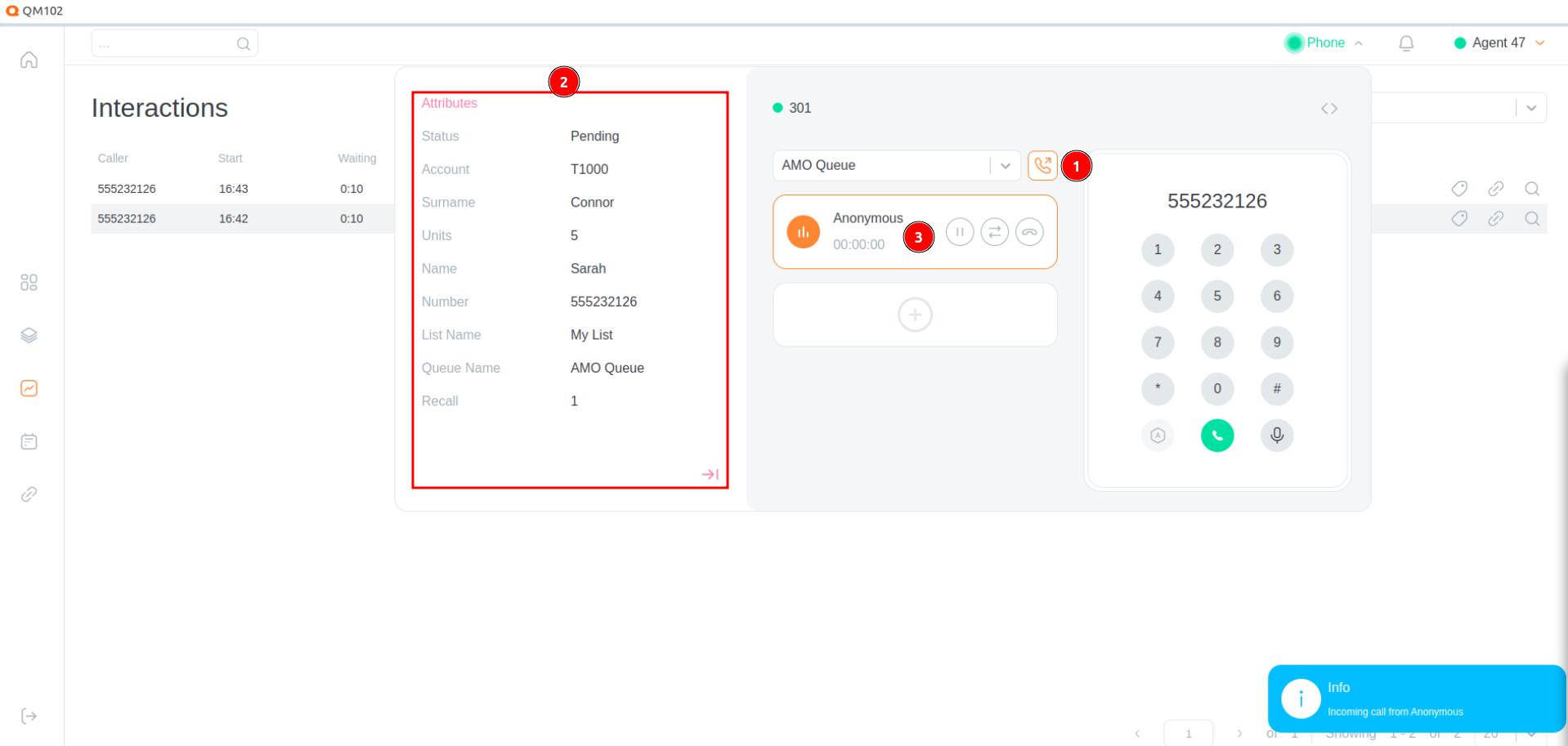
AMO enables agents to handle outbound calls with minimal effort:
- Next Call Selection: The system automatically selects the next call from the campaigns the agent is logged into. If no calls are available, a suitable message is displayed.
- Information Display: All relevant information, is shown to the agent.
- Call Execution: The call is started and logged automatically, ensuring all necessary data is captured.
AMO works seamlessly with any phone system, including physical phones, softphones, or the QueueMetrics WebRTC phone.
Setting it up
How do I set up and enable the AMO feature?
To enable the AMO feature for your campaigns (outbound queues) a supervisor, or admin, will need to first create an Outbound queue in QueueMetrics (if one is not already present).
-
Make sure the current Supervisor or Admin User has the
USR_AMOuser key assigned. (for more details on how the user keys work, you can check this Guide) -
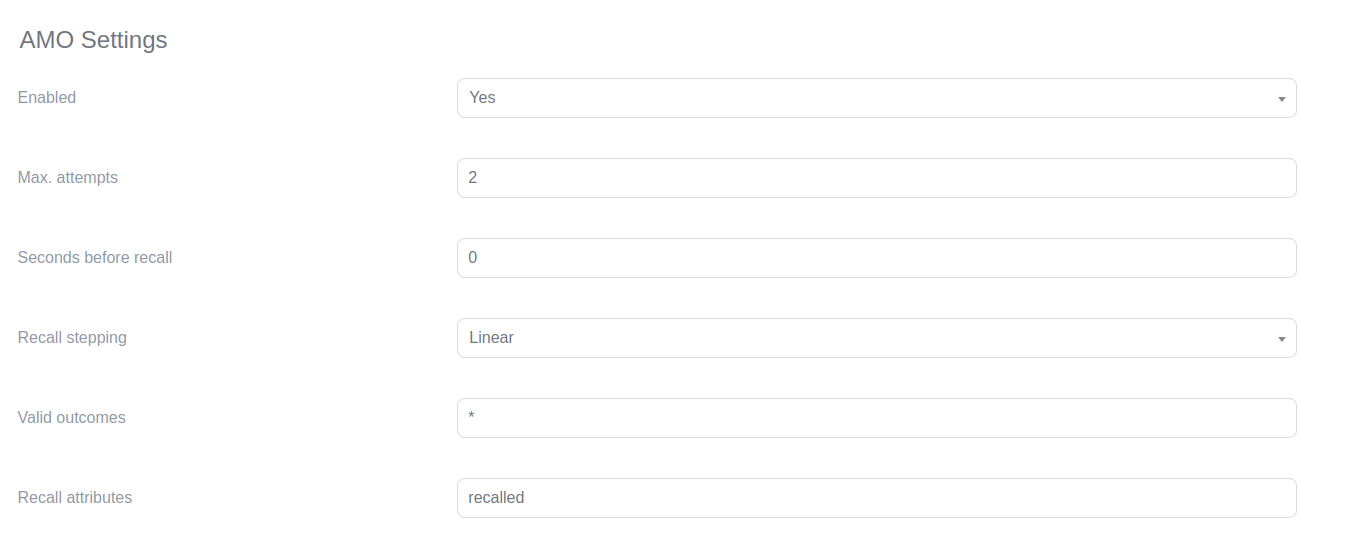
Configure Campaigns Ensure the outbound queues are set up for AMO dialing, in the QueueMetrics Queues configuration section.
Homepage → Settings → Queues → Edit the queue (pencil icon)
-
Navigate to the AMO section of QueueMetrics.
Homepage → Settings → AMO → Edit (pencil icon)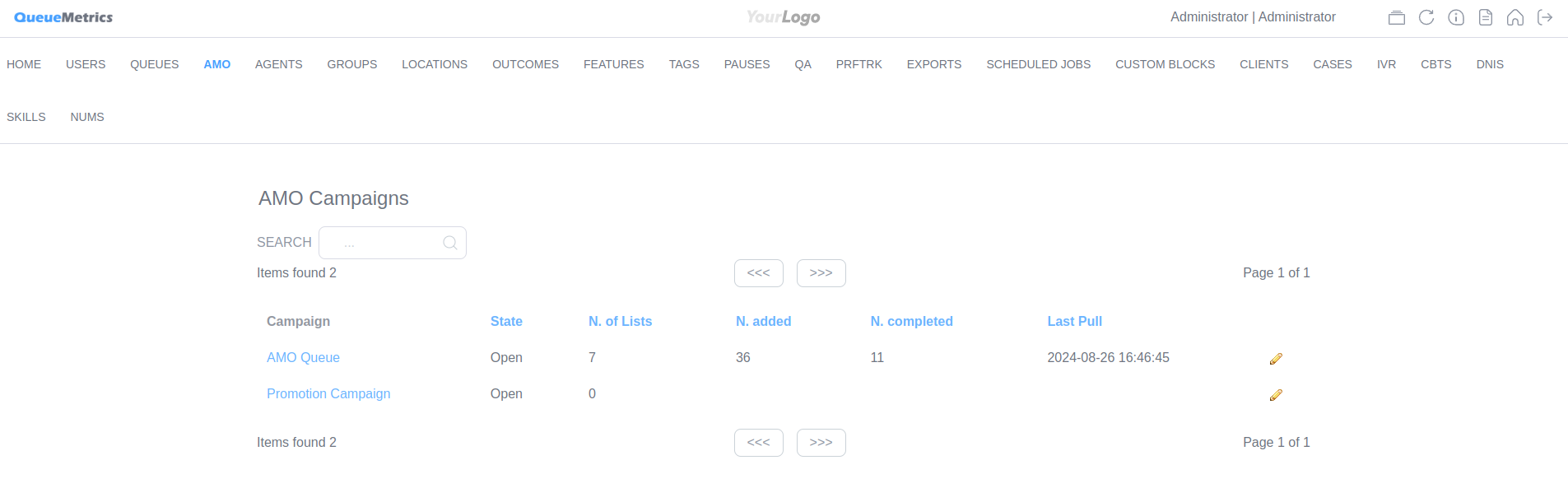
-
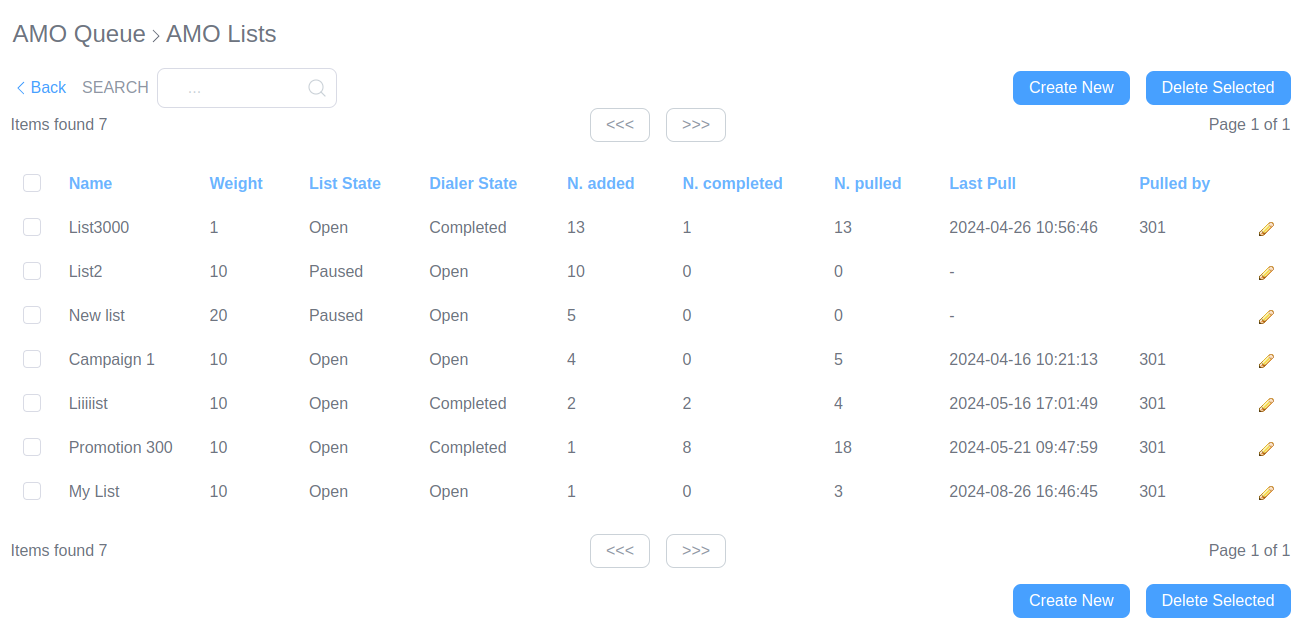
Define Call Lists Create and upload call lists manually or via CSV through the AMO Lists editor, or use API calls.
Homepage → Settings → AMO → Edit (pencil icon) → Create New
-
Add numbers You can manually add numbers and attributes to a number, or import a CSV file with a list of numbers and attributes.
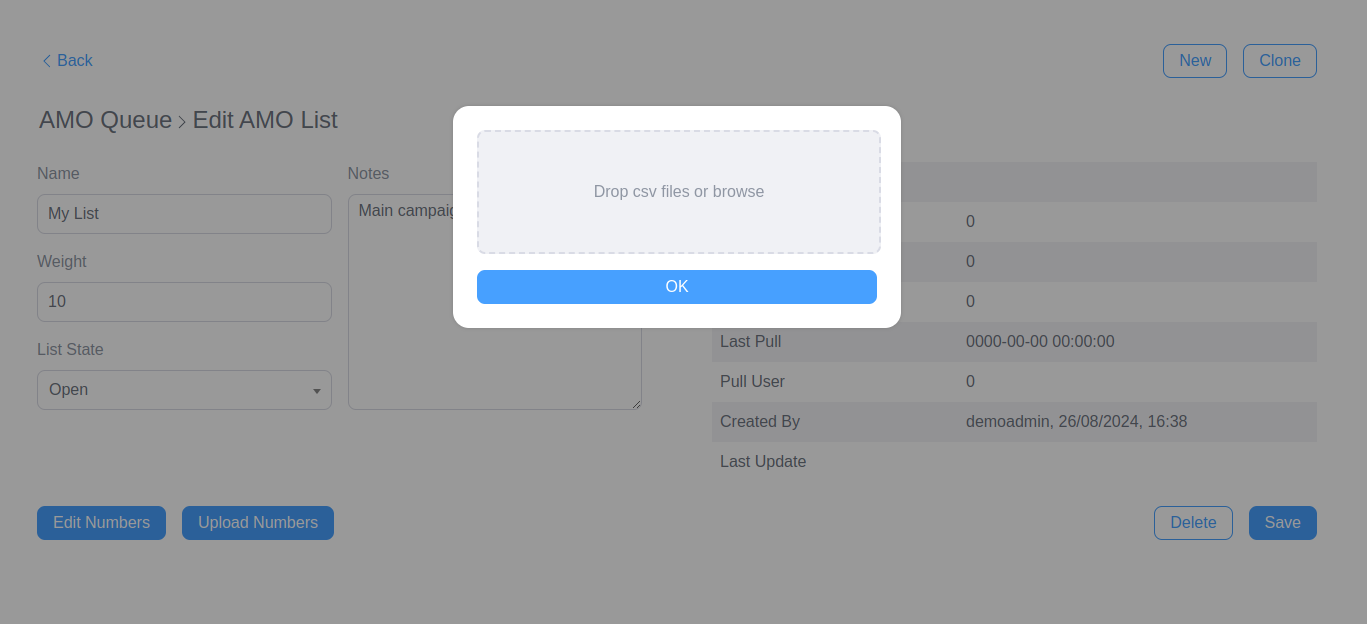
Managing Call Lists
Call lists are single-use and are consumed as calls are made. They can be populated in several ways:
- Manual Entry: Numbers are edited using the AMO Numbers editor.
- CSV Upload: A complete CSV file can be uploaded using the AMO Lists editor.
- API Calls: Lists can be fed through API calls as well.
Call Lists and the Mixer
Each AMO campaign is associated with a “mixer”, which manages the call lists linked to it:
- Mixer Functionality The mixer pulls the next call from the available lists based on their weight, allowing prioritization of certain calls.
- Campaign Completion A campaign is marked as “completed” when all calls in the active lists are fully processed. However, a campaign can reopen if new numbers or lists are added.
AMO Recalls
AMO includes a background process that manages call time-outs and handles recalls as needed:
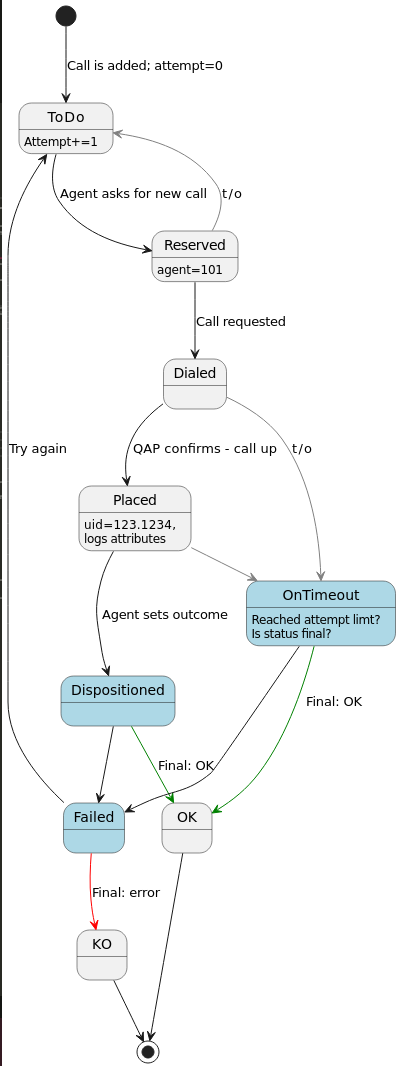
- Call Reserved: Recycled after 5 minutes if not progressed.
- Call Dialed: Rescheduled after 5 minutes if no logs are received.
- Call Outcome: Based on the outcome, the call is either completed or rescheduled.
Call Life Cycle
Details on the life cycle of a call
-
Call Requested:
The agent initiates a request for a new call from the AMO system. -
Call Selection:
The system selects a call from the relevant campaign list. If no call is available, a notification is shown. -
Call Assignment:
The selected call is assigned to the agent, displaying all necessary details. -
Call Dialing:
The agent starts the call with a single click, and the system tracks the process. -
Outcome Entry:
After the call, the agent logs the outcome, determining if the call is completed or needs rescheduling. -
Call Completion/Rescheduling:
The call is either marked as completed or automatically rescheduled based on the logged outcome. -
Campaign Monitoring:
Supervisors can adjust call priorities and monitor progress to ensure campaign goals are met.
Conclusion
AMO in QueueMetrics offers a streamlined approach to handling outbound calls, allowing agents to focus on their tasks with minimal interruptions. By using AMO, call centers can improve efficiency, ensure accurate tracking, and maintain a high level of service quality.
For more information on configuring AMO and managing campaigns, refer to the QueueMetrics documentation, or get in touch with our Support team.
About QueueMetrics
QueueMetrics is a highly scalable monitoring software that lets you track agent productivity, payrolls, measure targets, conversion rates, queues/ACDs, IVRs, music-on-hold, generate outbound campaign statistics and monitor realtime processes with customizable wallboards.
You can measure all activities in your contact center with more than 200 different metrics and manage realtime processes with live alarms and full control on calls and extensions, including whisper, spy and barge modes.
QueueMetrics is available on premise or as a cloud hosted service, and it is compatible with FreePBX, Grandstream, Issabel, MiRTA, Enswitch, Yeastar S PBX, VitalPBX, FusionPBX and many other Asterisk- and Freeswitch-based systems. It also supports Microsoft Teams telephony.
For more technical information please refer to the User Manual.
Visit www.queuemetrics.com for a free 15-day full-featured trial.
keyboard_arrow_left Back